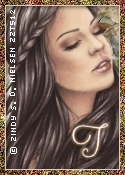
I made this as a matching set for my A fairy autumn harvest tag.
This tutorial was done with my own ideas any similarities are purely
coincidental. This tutorial is there for a guide you do not need to copy
it exact be as creative as you like.
Supplies needed
Psp, I am using psp x4, but any version will do.
PTU kit by Kittie's Sinful Designs call A Fairy Autumn Harvest. You can buy this kit from
Mystical Scraps
Lets Begin
I used a dropshadow on each of my elements as I went along, settings used were 2,2,50,5
For the banner open up a new transparent image 600 x 250. Go to selections, select all, copy and paste a paper of choice on to the canvas.Select none.
Open up element 114. Free rotate 90 degrees left. Copy and paste to your canvas, resize by 125 percent. Grab your magic wand and click inside the frames. Selections, select all, float defloat, add a new layer. Get another paper and copy and paste into selections. keep selected. Move paper down under the frame.
Copy and paste your tube, move into one of the frames, select none. Duplicate your tube. On the duplicate, guassian blur 4 and change blend mode to screen. On the original change the blend mode to luminance legacy.
Copy, paste and resize some of the elements from the kit an place on your canvas, see my tag for ideas on where to place them.
When you've placed your elements to your liking, clicking on the bottom layer, selections, select all, float, defloat. Add a new layer and move up to the top.
Copy and paste a paper into the selection, modify and contract by 7 then hit delete on your keyboard. Adjust, add noise 54 percent, guassian with monochrome checked.
Copy and paste your tube and place in the middle of your tag,
Add your copyright and name, and save as a png.
For the avatar I duplicated my tag, Shift and D.
with your crop tool crop a part of the tag you want to use as the avatar. crop the tag to the size you want your avatar, mine is 125x162. I cropped mine on the blended tubes. I also added a few elements and merged them down together then duplicated. On the duplicate, guassian blur 4 and change blend mode to screen. On the original change the blend mode to luminance legacy.
For the border do the same as your banner but contact by 5 rather than 7.
Add your copyright and name or initial, and save as a png.
I hope you liked my tut, would love to see your results